
What Site Owners, Developers, and Agencies Need to Know

WordPress 7.0 is shaping up to be one of the most important platform updates in years, not because every major feature is arriving fully formed on day one, but because it shows where WordPress is headed next.

This release continues WordPress’s evolution from a traditional content management system into a more flexible publishing and site-building platform. For site owners, that means a cleaner editing experience, better design controls, and more practical tools inside the block editor. For developers and agencies, it means new APIs, better integration patterns, and a stronger foundation for building modern WordPress experiences.
One of the biggest changes is the introduction of AI infrastructure in WordPress core. This does not mean WordPress is simply adding a built-in AI writing button. Instead, WordPress 7.0 introduces a more standardized way for plugins and developers to connect with AI providers through WordPress itself.
It is also worth noting that real-time collaborative editing, which was previously expected in WordPress 7.0, has been removed from this release so the feature can be tested further before being added to core.
What Is the Focus of WordPress 7.0
WordPress 7.0 focuses on three major areas: modernizing the editing experience, expanding developer-facing APIs, and preparing WordPress for a more connected future.
The most important changes are not only the visible ones. Yes, users will see improvements to the admin interface, blocks, patterns, revisions, and site editing tools. But under the hood, WordPress 7.0 also introduces foundational work that plugin developers, agencies, and hosting providers will build on over time.
AI is one example. Rather than forcing every plugin to manage its own AI connection in a different way, WordPress 7.0 introduces a more consistent foundation for AI-powered features. This should make future AI tools easier to build, easier to manage, and less fragmented for site owners.
Collaboration also remains a major direction for WordPress, although real-time collaborative editing has been pulled from the 7.0 release. That decision may disappoint some users, but it also shows the project is prioritizing stability, performance, and content safety over rushing a complex feature into core.
In short, WordPress 7.0 is not just about new features. It is about making WordPress more flexible, more extensible, and better prepared for the way people build websites today.
What This Means for Different WordPress Users
WordPress 7.0 will not affect every user the same way.
For everyday site owners, the biggest benefits are likely to come from editor improvements, safer pattern editing, easier design controls, and a more polished admin experience.
For agencies, the release is more about workflow. Better revisions, content-only pattern editing, block-level controls, and future collaboration work all point toward a WordPress experience that is easier to hand off to clients without giving up design control.
For developers, the most important changes may be under the hood. The AI Client, Connectors API, and related developer-facing improvements give plugin authors and agencies a cleaner foundation for building integrations, automation, and AI-assisted tools inside WordPress.
For the broader WordPress community, WordPress 7.0 is a reminder that the platform is still evolving. It is not trying to become a closed website builder. It is continuing to move toward a more flexible, extensible, open system for publishing and building on the web.
Admin Interface Updated
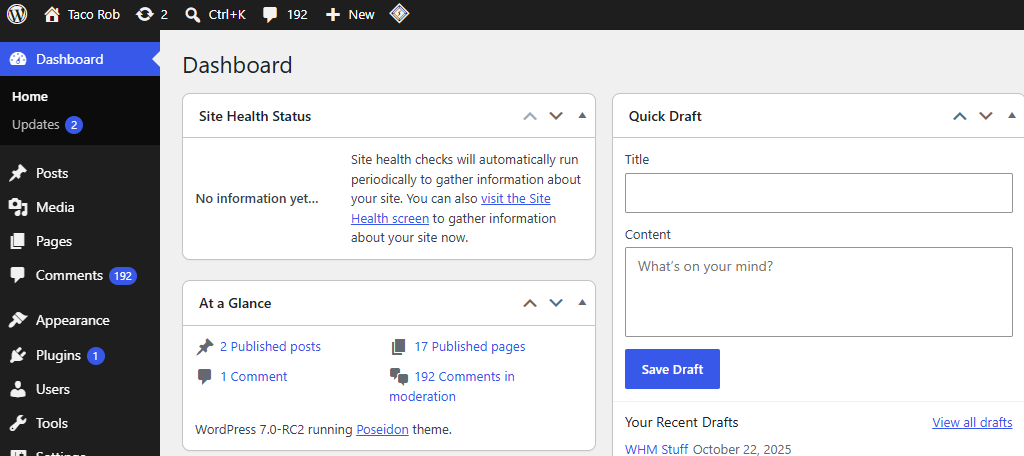
One of the first things users may notice in WordPress 7.0 is continued refinement of the admin experience.
The updated interface is designed to feel cleaner, more modern, and easier to navigate. Visual improvements such as typography, spacing, notification styling, and screen transitions can make everyday tasks feel smoother for site owners and content teams.
These changes may not be as headline-grabbing as AI or collaboration, but they matter. Most WordPress users spend their time inside the dashboard, so even small usability improvements can make managing a site feel faster and less frustrating.
AI Infrastructure Comes to WordPress
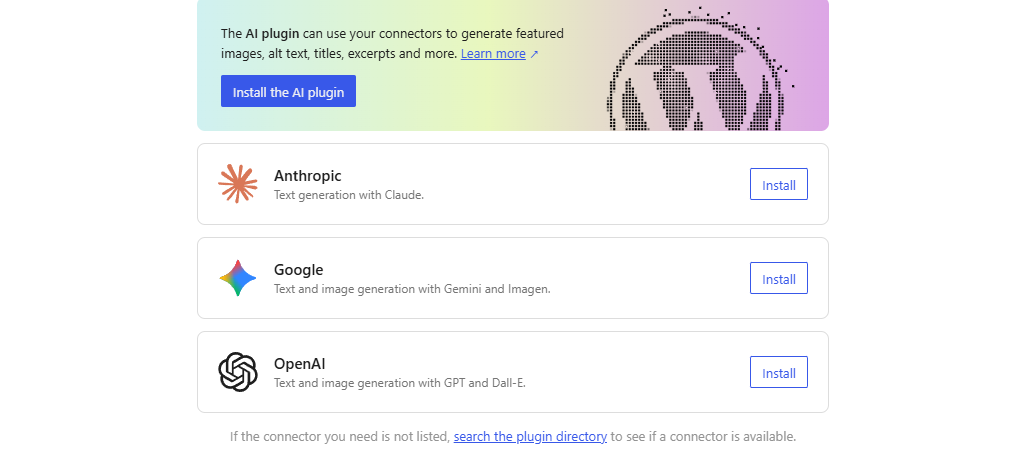
One of the most important additions in WordPress 7.0 is the new AI Client.
This does not mean WordPress 7.0 is turning core into a full AI website builder. It is a provider-agnostic PHP API that allows plugins to send prompts to AI models and receive responses through a more consistent WordPress-native interface.
That distinction matters.
Until now, most AI tools in WordPress have worked independently. One plugin may connect to OpenAI one way, another plugin may connect to Google or Anthropic another way, and each plugin may handle API keys, settings, prompts, and responses differently.
WordPress 7.0 begins to create a shared foundation for that work. The Connectors API also helps standardize how external services and provider connections are registered and managed, which should make AI-related settings easier for plugins to expose in a consistent way.
For everyday users, this should eventually mean AI-powered WordPress tools that feel more consistent and easier to manage. For developers, it means less duplicated integration work. For agencies, it means a cleaner path to building AI-assisted workflows for clients without locking them into one vendor or one plugin.
The bigger takeaway is that WordPress is not trying to become a closed AI platform. It is doing what WordPress has always done well: creating an open foundation that developers can build on.
In practical terms, this could lead to better tools for content drafts, summaries, product descriptions, accessibility checks, image metadata, internal search, support workflows, and site management. However, many of those use cases will still depend on plugins, provider connections, and how developers choose to use the new API.
Real-Time Collaboration Is Still Coming — But Not in WordPress 7.0
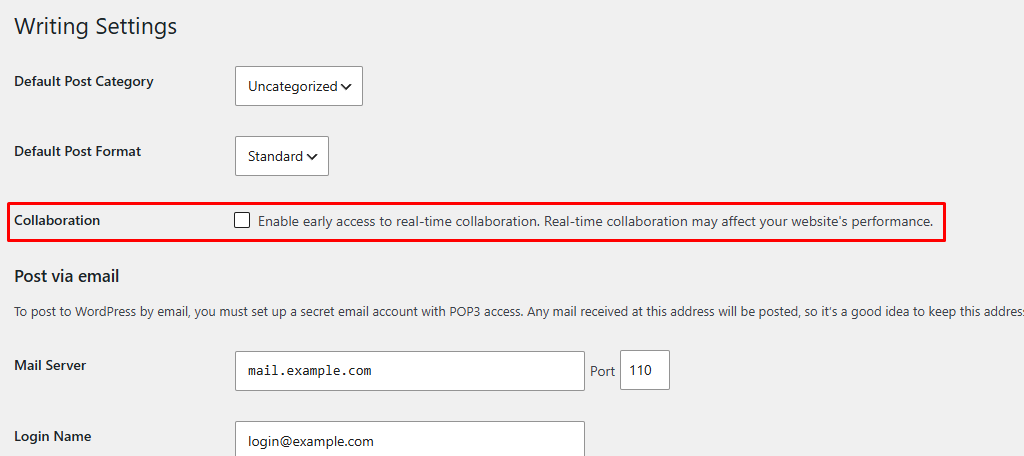
Real-time collaborative editing was one of the most anticipated features planned for WordPress 7.0. It would have moved WordPress closer to tools like Google Docs, where multiple users can work inside the same document at the same time.
However, WordPress has confirmed that real-time collaboration will not ship in WordPress 7.0.
The reason is simple: collaboration inside a CMS is much more complex than showing multiple cursors on a screen. WordPress needs to account for autosaves, revisions, user permissions, custom blocks, plugin conflicts, server load, memory usage, and the wide range of hosting environments that WordPress runs on.
Removing the feature from 7.0 may sound disappointing, but it is the right decision for site owners. A collaboration tool is only valuable if it protects content, avoids editing conflicts, and works reliably across real-world WordPress sites.
The good news is that collaborative editing remains an important part of WordPress’s future. The feature is not being abandoned. It is being held back so it can be tested, refined, and introduced when it is stable enough for core.
For now, WordPress 7.0 should be viewed as a step toward better editorial workflows — not the final arrival of Google Docs-style editing inside WordPress.
Updated Revisions View
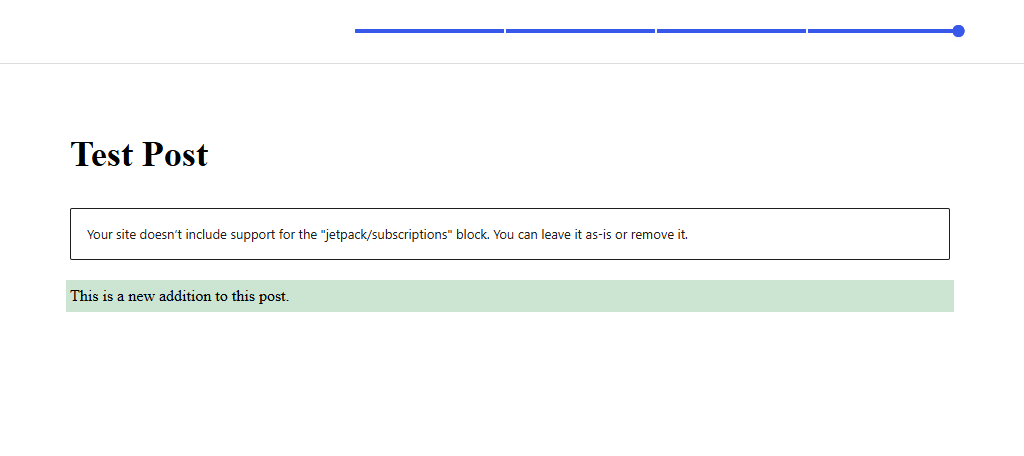
Before WordPress 7.0, the Revisions area displayed content in HTML code. As such, it was hard to identify what changed if you were not already familiar with reading HTML. Many WordPress users are not, but the Revisions display has now been updated.
Starting with version 7.0, revisions will now use a visual interface.
Or, in other words, the revision will look exactly like the post or page does. You can spot content that was added, as it will be highlighted green, or content that was removed, which will be highlighted red.
This improvement is especially useful for teams, agencies, and content-heavy websites. Even without real-time collaboration shipping in WordPress 7.0, a clearer revisions experience makes it easier to review changes, restore previous versions, and understand how content has evolved over time.
For site owners, this is one of the more practical quality-of-life improvements in the release. Revisions become easier to understand without needing to read raw HTML or compare blocks manually.
Fonts Library Expanded to Classic Themes
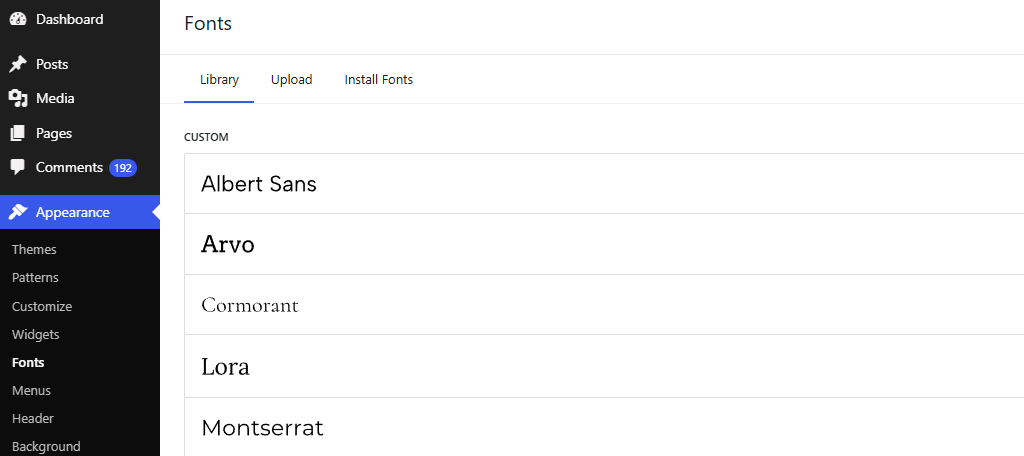
Originally introduced in WordPress 6.5, the Fonts library was limited to Block-Based themes. This allowed you to upload and choose the font type for your website as easily as possible.
Before this, sites were limited to the fonts that were included with their themes, or they had the option to install a dedicated font plugin that could add more font options for sites to use.
With WordPress 7.0, the Font Library expands to classic themes, giving more WordPress users access to easier font management without requiring a full block theme.
This is a meaningful improvement because many business websites still use classic themes. In the past, changing fonts often required the Customizer, a dedicated font plugin, or direct theme edits. Bringing font management into a more consistent WordPress experience helps site owners make design changes without needing a developer for every small typography update.
For agencies, this also makes handoff easier. Clients can manage approved fonts more safely, while developers can spend less time hard-coding basic design changes.
Two New Blocks
Blocks are the foundation of the modern WordPress editing experience, and WordPress 7.0 adds two useful blocks that many site owners have wanted for years: Icon and Breadcrumbs.
These may sound like small additions, but they matter. The more WordPress can handle common design and navigation needs natively, the less users need to rely on extra plugins for basic site-building tasks.
Icon Block
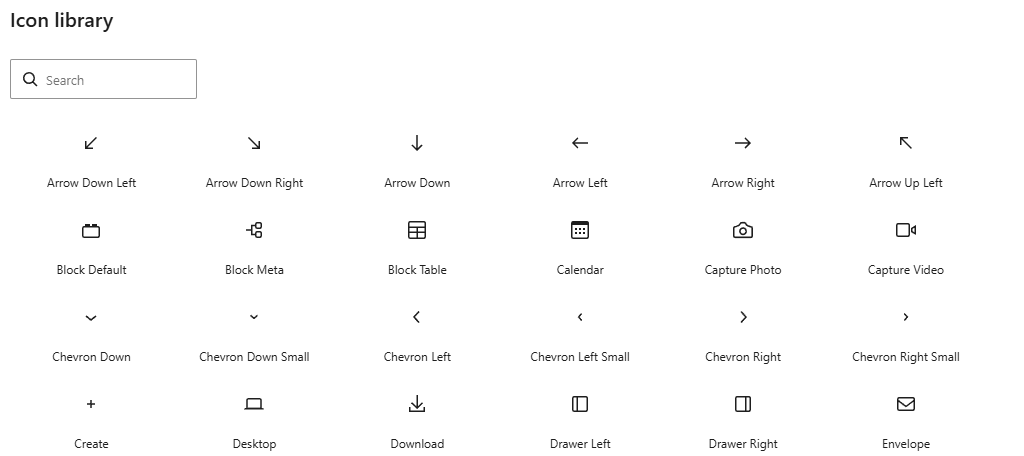
The Icon block is exactly what it sounds like. This block makes it easy to add SVG icons directly into a post or page. Block settings allow you to customize various aspects of the icon, which include:
- Size
- Margins
- Border
- Text color
- Background color
The initial icon library is expected to include 88 icons to choose from. This will be expanded over time. It also currently lacks a way to upload your own icons, so if you are already using a plugin for custom icons, that will still be the best option.
Breadcrumbs Block
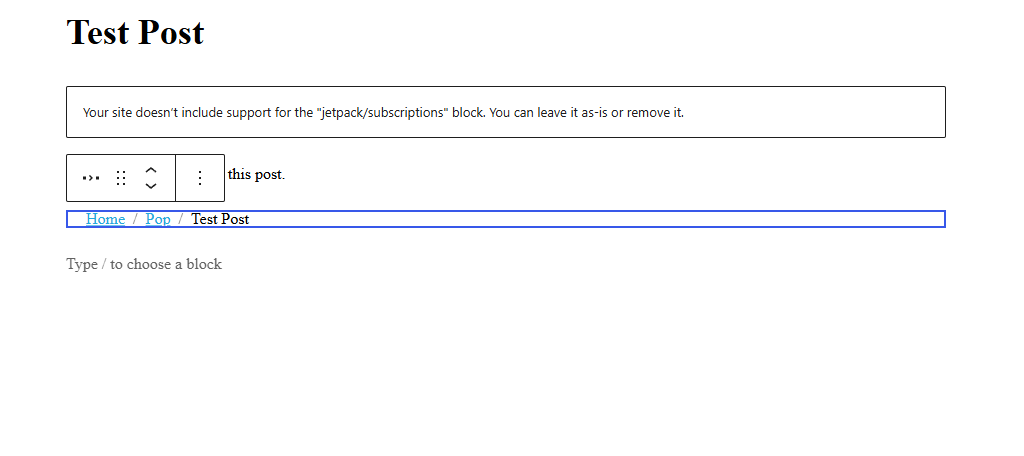
Breadcrumbs help improve site navigation by showing users where they are currently located on a website. Before WordPress 7.0, users would need to install a dedicated breadcrumbs plugin to easily add this functionality.
However, that is no longer the case. The Breadcrumbs block is finally here.
It generates a breadcrumb trail that can improve navigation and help users understand where they are on your website. Some of the customizations include:
- Color Options
- Typography
- Separators
- Show/Hide Home Icon
- Custom Appearance for Last Item in the Trail
If you already use a dedicated breadcrumbs plugin, do not replace it automatically. Review how your current plugin handles templates, schema, styling, and theme placement before switching to the native block.
Various Block Updates
Existing blocks will also see a variety of updates. These range from general updates for every block to specific block updates. Let’s take a look at what you can expect from blocks in 7.0.
Heading Blocks Are Now Separate
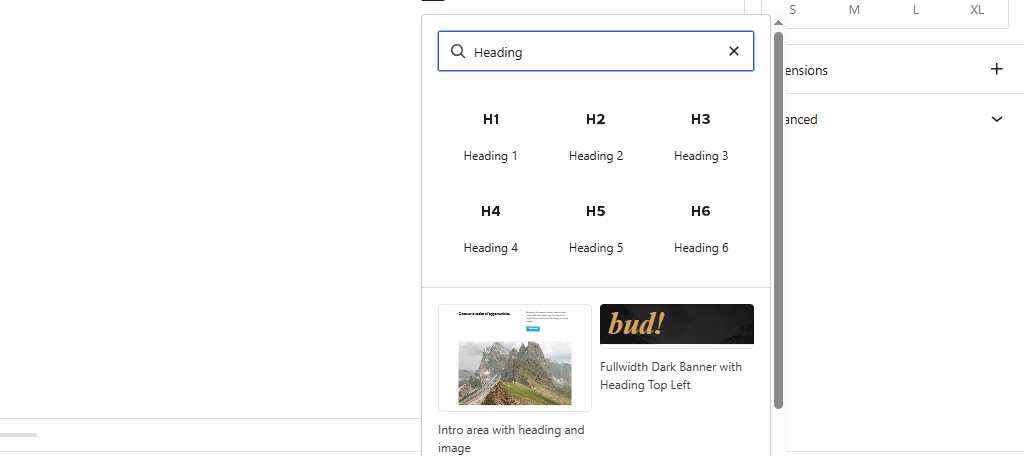
The Heading block previously gave users access to Headings 1 through 6. However, after WordPress 7.0 goes live, the Heading block will be separated into 6 individual blocks, Heading 1 through 6.
This will make it quicker to add the specific Heading that you want to add. You can also favorite the headers that you use most frequently for quicker access. The original Heading block is still available for those who don’t wish to change anything.
Custom CSS at the Block Level
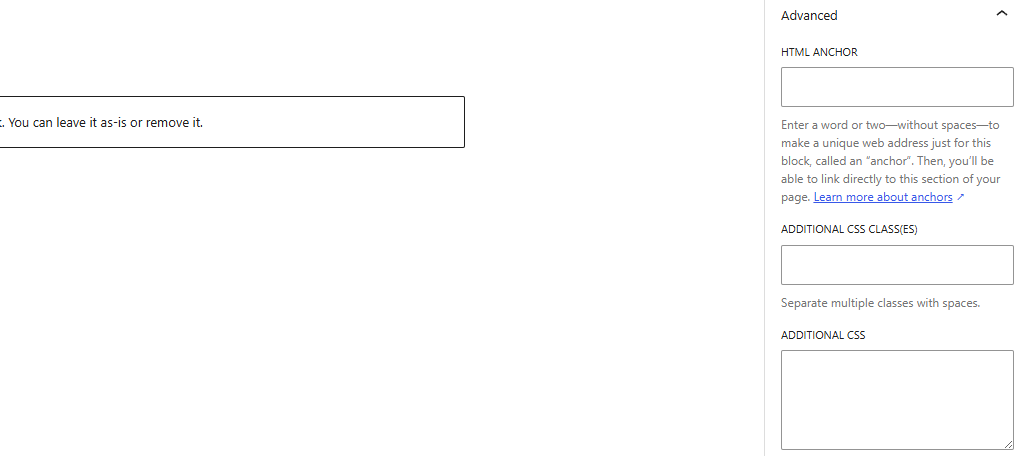
WordPress 7.0 also gives users more control over individual blocks by adding custom CSS options at the block level.
This is useful for advanced users, designers, and agencies that want to fine-tune a specific section without creating a full child theme or adding sitewide CSS that affects other areas of the website.
That said, this feature should be used carefully. Block-level CSS is powerful, but too many one-off customizations can make a site harder to maintain over time. For business websites, the best approach is still to use global styles, theme settings, and reusable patterns wherever possible — then reserve custom CSS for targeted changes.
If you are not comfortable writing CSS, work with a developer or use trusted tools that help you preview and test changes before publishing them.
Hide Blocks on Specific Devices
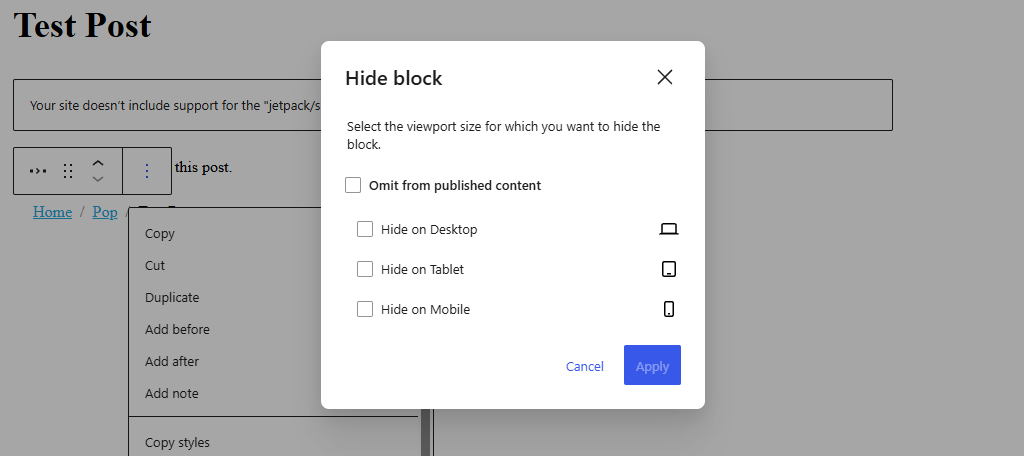
All blocks will now have the ability to be hidden on specific devices. These include options to hide them on Desktop, Tablet, and Mobile. This feature used to require an additional plugin to achieve, but it will now be a native feature.
While the gap between mobile devices and desktops has shrunk considerably over the years, one factor that will never change is the space available on screen. Mobile devices have smaller screens, and that will not change.
Used properly, device-specific visibility can improve the user experience. For example, a large desktop hero section may not work well on mobile, while a simplified mobile version may load faster and be easier to navigate.
However, this feature should not be used as a shortcut for poor responsive design. Hiding content on mobile can create SEO, accessibility, and consistency issues if important information is removed for certain users.
The best use case is to simplify the presentation of content by device — not to show completely different messages to different users.
WordPress 7.0 also adds the ability to hide blocks from published content. This can be useful for seasonal promotions, temporary notices, draft sections, or reusable content that should be prepared in advance but not displayed yet.
Enhanced HTML Block
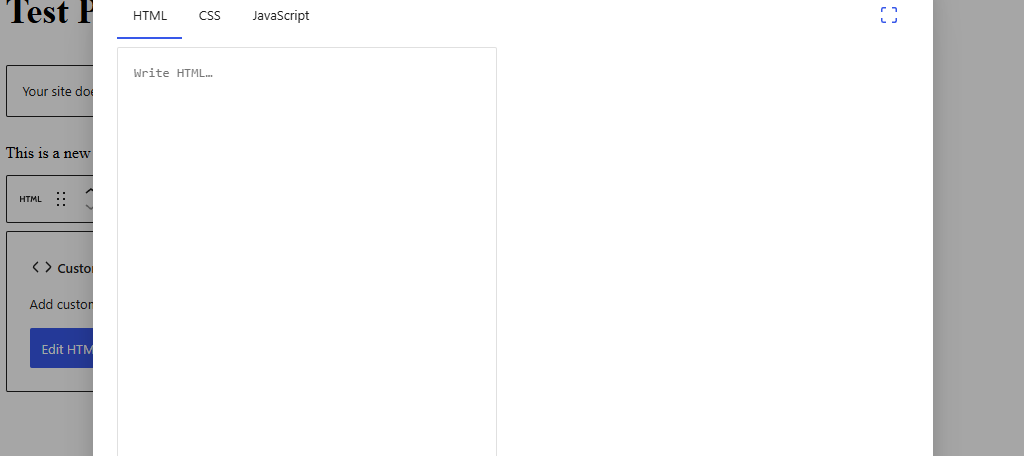
The HTML block is also becoming more useful for advanced users and developers.
Instead of working inside a small text box, users get a larger editing experience with better separation for HTML, CSS, and JavaScript. This makes the block more practical for small embeds, custom snippets, prototypes, and advanced layout work.
For most site owners, this will not replace proper plugin or theme development. But for developers and agencies, it can make small customizations easier to test and manage directly inside the editor.
As always, custom code should be used carefully. Poorly written HTML, CSS, or JavaScript can affect layout, accessibility, performance, and security.
Text Indentation and Columns
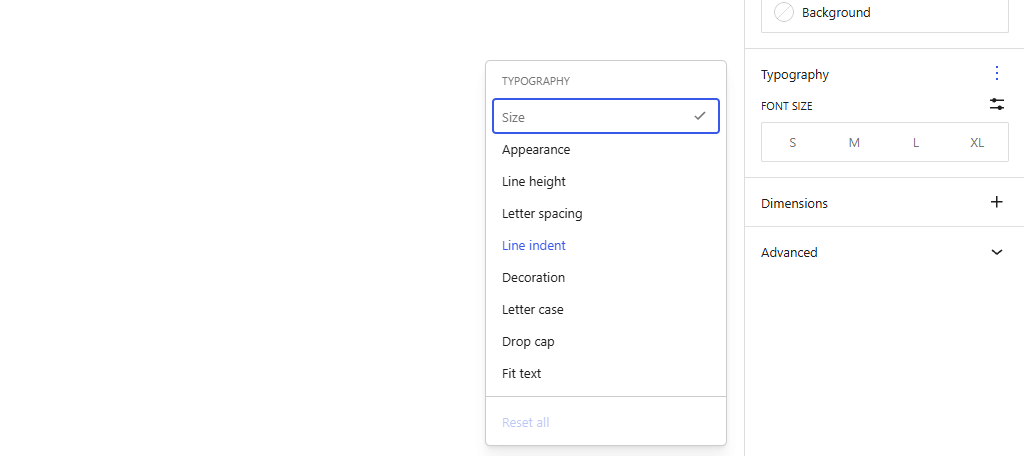
When WordPress switched from the Classic editor to the Gutenberg editor, text indentation was lost. While you could still achieve it in a variety of ways, or by installing a dedicated plugin, it wasn’t very intuitive.
Going forward, Paragraph blocks will now have a Line Indent option in the Typography settings.
Columns have also undergone an upgrade with more layout options. More importantly, the grid layout will reorganize columns better. This will result in fewer manual adjustments needing to be made. And yes, text indentation is available in columns as well.
Improved Pattern Editing
The Pattern system was a game-changer when it was first introduced, as it allowed users to create pre-made block arrangements that they could quickly add to their content and share with other users.
One of the biggest challenges with patterns has been protecting the structure of a design while still allowing users to edit the content inside it.
This matters a lot for agencies and business websites. A developer may create a polished testimonial section, pricing block, service layout, or call-to-action pattern, but a client still needs to update the text and images without accidentally breaking the design.
WordPress 7.0 improves this workflow by making patterns safer and easier to edit. Content-only editing helps users change the parts they are supposed to change — such as text and images — while preserving the underlying layout.
Spotlight Mode also helps by dimming the rest of the editor so users can focus on the pattern they are editing.
For client-managed websites, this is one of the most practical improvements in the release. It helps WordPress become more user-friendly without sacrificing design consistency.
Mobile Menu Overlays
The Site Editor has also undergone some updates, with one of the biggest headliners being the addition of mobile menu overlays. These can be built directly in the site editor using blocks.
These mobile menu overlays can be saved and reused throughout the site. They have a variety of customization options due to using the blocks available in WordPress. One of the key features is the customizable close button.
Not only can you customize the appearance of what the close button for the menu looks like, but you can also place it in any location you want. This makes it easier to fit into menus that are shaped differently than traditional options.
These overlays also include a visual preview mode, making it easier to see how the menu will look on your site and test whether it feels touch-friendly for mobile users.
This Is Just the Beginning
WordPress 7.0 should be viewed as a foundation release as much as a feature release.
Some improvements will be visible immediately. Others, like AI infrastructure and future collaboration workflows, will become more valuable as plugin developers, theme authors, agencies, and contributors build on top of them.
It is also important not to overstate what is arriving in 7.0. Real-time collaboration is no longer part of this release, and native multilingual support remains a longer-term area of development rather than a reason to remove translation plugins today.
That is the right way to look at WordPress: not as a single release that solves everything at once, but as an open platform that keeps evolving through core development, plugins, themes, hosts, agencies, and the broader community.
For WordPress users, there is still a lot to look forward to, but the best approach is to stay informed, test major updates carefully, and keep your site running on a modern hosting environment.
How Site Owners Should Prepare for WordPress 7.0
Before updating to WordPress 7.0, site owners should take a few practical steps:
- Make sure your site is running PHP 7.4 or higher.
- Update your plugins and theme.
- Create a full backup of your website.
- Test the update in a staging environment if your site is business-critical.
- Review forms, checkout pages, menus, custom blocks, and key landing pages after updating.
- Check whether any plugins you rely on have posted WordPress 7.0 compatibility notes.
GreenGeeks customers can also check their hosting account to confirm the PHP version their site is using, review available backups, and contact support if they are unsure whether their site is ready for a major WordPress update.
This is especially important for WooCommerce stores, membership sites, learning platforms, agency-managed websites, and any site using custom blocks or advanced editor features.
WordPress 7.0 FAQ
WordPress 7.0 adds a lot of new features to existing components, as well as creating entirely new tools to use. You may still have some questions, so here are some of the most frequently asked questions about this update:
WordPress 7.0 drops support for PHP 7.2 and PHP 7.3. That means your site should be running PHP 7.4 or higher before updating. However, PHP 7.4 is already outdated, so site owners should use a currently supported PHP version whenever possible. Before changing PHP versions, test your site, plugins, and theme to make sure everything works properly.
No. WordPress 7.0 adds AI infrastructure for developers and plugins, but site owners are not required to use AI.In most cases, AI features will still depend on plugins, configured providers, API keys, and user permission. This gives site owners more control over whether AI is used on their website and how it is connected.
No. Real-time collaborative editing was planned for WordPress 7.0, but it has been removed from the release so the feature can be tested and improved further. Collaboration remains an important direction for WordPress, but it will not be part of the initial 7.0 release.
The Font Library can support uploaded custom fonts and fonts provided by your theme. It also integrates with Google Fonts, giving users access to a large library of font options. However, site owners should still be selective. Too many font families or weights can slow down a website, so it is best to keep typography choices simple and performance-friendly.
No. The Icons block is very limited at release. The block will be expanded over the years with a more robust icon offering, but there is no confirmation of an upload feature being added at this time.
No. WordPress 7.0 is not expected to include a new default theme. Unlike some previous major releases, the focus is on platform-level improvements rather than introducing a new Twenty Twenty-Six theme. That does not mean themes are becoming unnecessary. Themes still control important parts of a site’s design, layout, templates, and editing experience. WordPress 7.0 simply continues the trend of giving users more flexibility inside the editor and Site Editor.
Most actively maintained plugins should be updated for WordPress 7.0, but compatibility issues can still happen with any major release. Pay close attention to plugins that modify the block editor, add custom blocks, manage AI integrations, control typography, or rely on older PHP versions. Before updating a business-critical website, create a backup, update plugins and themes, and test the site in staging if possible.
WordPress 7.0 is About the Future of the Platform
WordPress 7.0 is an important release, but the real story is bigger than any single feature.
This update continues WordPress’s shift toward a more flexible, visual, and developer-friendly platform. Site owners get a better editing experience. Agencies get safer workflows for client-managed websites. Developers get new foundations for building AI-powered and integration-friendly tools.
Not every anticipated feature is arriving in 7.0. Real-time collaboration has been delayed, and some of the most exciting changes will take time to mature. But that is not a weakness. It is a sign that WordPress is trying to balance innovation with the stability that millions of websites depend on.
For site owners, the best next step is simple: keep your WordPress site updated, confirm your PHP version is current, test major updates carefully, and make sure your hosting environment is ready.
At GreenGeeks, we continue to support WordPress users with hosting built for performance, reliability, security, and the modern WordPress experience.
WordPress 7.0 is not just another update. It is another step toward the next era of WordPress.



 English
 Dutch
Dutch French
 German
 Italian
 Japanese
 Korean
 Portuguese
 Russian
 Spanish