
How to Fix Amazon Prime HTTP Proxy Error in USA in 2023
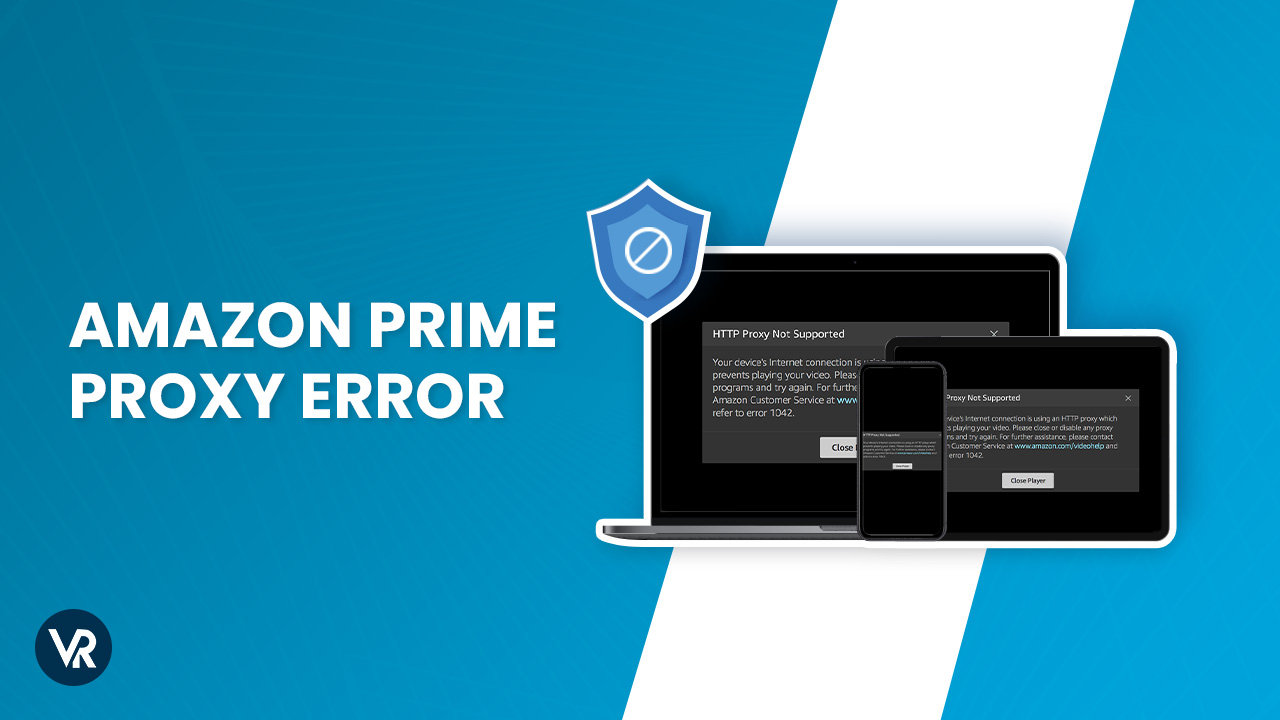

If you encounter the Amazon Prime HTTP proxy error or ‘No Internet There Is Something Wrong With the Proxy Server‘, you can try resolving it by stabilizing your internet connection. Or simply, you can also fix Amazon Prime HTTP proxy error in USA by clearing your browser’s cache and cookies.
The Amazon Prime HTTP proxy error occurs when attempting to access Amazon Prime content in the USA using a proxy or a VPN. To resolve it instantly, disable any proxy programs and ensure your device is not connected to a VPN or a proxy server.
Even if you’re connecting to Amazon Prime USA from anywhere abroad, try using only a premium and the best VPN for Amazon Prime like ExpressVPN to avoid any Amazon Prime HTTP proxy error issues.
Furthermore, check if there are any available updates for both your operating system and web browser – keeping them up-to-date ensures optimized performance and enhanced security protocols. Well, cut the cord and simply learn how to fix Amazon Prime HTTP proxy error in USA with a VPN.
How to Fix Amazon Prime HTTP Proxy Error with a VPN?
To fix Amazon Prime HTTP proxy error with a VPN, follow these steps:
If you still encounter the error, try clearing your browser’s cookies or attempting to connect using a different server. You can also contact your VPN’s customer support for further assistance.
What’s Causing Amazon Prime HTTP Proxy Error in USA?
The Amazon Prime HTTP proxy error in USA is because your VPN or Smart DNS has been detected. This error indicates that the Amazon systems have caught you using a VPN connection to bypass the platform’s Firewall. Though VPN can help you unblock geo-restricted content on Amazon Prime, not all the service providers are strong enough to maintain a stable connection.
Since you’re here, we assume you’ve also come across one of the following error messages and looking for ways to learn how to fix Amazon Prime HTTP proxy error in USA:
“Your device’s Internet connection is using an HTTP proxy which prevents playing your video. Please close or disable any proxy programs and try again.”
OR
“Your device is connected to the internet using a VPN or proxy service. Please disable it and try again. for more help, go to amazon.com/vpn.’’
Amazon Prime HTTP Proxy Error in USA.
If you are too agitated seeing this one HTTP proxy error on Amazon Video repeatedly even after using VPN, this means that Amazon Prime is smart enough to trace the VPN connections to prevent its users from bypassing its licensing agreements. Also, if you are using SmartDNS technology, it is much easier to detect it than a VPN server. As a result, your Internet traffic goes down.
A reliable VPN works by encrypting your internet traffic and re-routing it through a different international server, specifically the server from the country you want to access. For example, if you want to stream your favorite US titles on Amazon Prime outside USA, you can connect to any US server.
In this article, we will show you how to fix Amazon Prime HTTP proxy error in USA and which VPN works best for this popular platform.
How to Fix Amazon Prime HTTP Proxy Error in USA?
If you’re still facing an Amazon HTTP proxy error outside USA and wanted to find out How to Fix Amazon Prime HTTP proxy error Outside USA, try the following methods to fix it:
1. Preliminary Checks
Mark these preliminary checks before moving further to any other fixes:
- Before using your Amazon Prime VPN, you must close any other VPN apps already active on your computer.
- Antivirus and Firewall programs occasionally interfere with internet connectivity. So, ensure that any connection problems aren’t caused by them. The best way is to disable them before reconnecting to your VPN. Or you may also put the VPN program in exception before turning on your security program again.
- After disconnecting from your VPN, visit the website to confirm your internet connection is active.
- Connect to the most convenient server location for you. If it helps, the issue is with the server location to which you were originally connected.
- Alternatively, you can adjust your DNS settings or switch networks. To see if the problem is with your current ISP, connect to a different network, such as a public Wi-Fi network.
2. Incorrect System Date and Time
Always double-check your date and time before trying any other thing. The VPN cannot successfully develop the connection if your date and time are incorrect. Here is how you update it:
3. Change the VPN Server
Changing the VPN server also helps redevelop the connection to Amazon Prime Video. Usually, when Amazon Prime blocks the server, it cannot connect to it unless the VPN provider updates it. So, changing the server helps.
Here is how you do it:
4. Clear Cache and Cookies
Sometimes cookies and cache store your location information, thus becoming a reason for Amazon Prime not working with VPN. You can clear them and then reconnect to your VPN. To clear cache press CTRL + SHIFT + DEL.
5. Flush DNS
The DNS entries in your device can cause problems while you are trying to bypass Amazon Prime Firewalls. So, clear them before establishing the VPN connection.
Here is how you do it.
6. Update VPN App
Most VPN mobile apps automatically update, but the same does not happen for PCs. If your Amazon Prime VPN not working errors interrupt your streaming only on your desktop, you’re using an outdated version. To resolve the proxy error, go to your App Store and download the most recent desktop app.
7. No IP or Host Not Found
If the error message says, “The requested name is valid but does not have an IP address or Host not found,” make sure you are connected to the Internet.
Mind that the VPN is not a replacement for an Internet connection. So, after trying all the above solutions, if your error problem persists, try checking your internet connection again.
Also, your ISP may be restricting your VPN DNS server. In this case, you have to manually input the DNS address.
Activate the Network Connections menu.
The DNS Server Settings
Quick Overview: Best VPNs to Fix Amazon Prime Proxy Error in USA?
We tried and tested more than 60 VPNs for their unblocking potential, speed, and security for Amazon Prime. However, most of them end up being detected and blocked. Here are the three best VPNs for Amazon Prime Streaming:
Best VPNs to Fix Amazon Prime Proxy Error in USA? In-depth Analysis
Here is a detailed analysis of the three best VPNs that never give you an Amazon Prime VPN Error due to their sophisticated technology:
1. ExpressVPN: The Best VPN to Fix Amazon Prime HTTP Proxy Error in USA

Key Features
- 3000+ servers in 94 locations globally
- Media Streamer, a sophisticated SmartDNS tool
- Unblocks Amazon Prime: Yes
- Simultaneous connections: 5
- High speed
- 30-day money-back guarantee
- Unlimited bandwidth
- Price: $6.67/mo
ExpressVPN is the best VPN for fixing the Amazon Prime HTTP proxy error and helps you access all your favorite shows and movies with outstanding speed and security. Every server provides a stable internet connection, lightning-fast speeds, and military-grade security and privacy. That’s why ExpressVPN’s the best VPN for Amazon Prime as well.
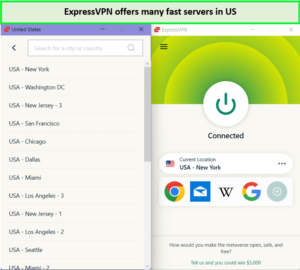
ExpressVPN’s US servers are fast and efficient and bypass Amazon Prime Video easily in–USA.
So, if you want that Amazon Prime VPN Error never to be a problem again, trust ExpressVPN to provide you with state-of-the-art VPN services. ExpressVPN servers’ unblocking capability of Amazon Prime to stream American content gave us mind-blowing results. As soon as we connected to the US-New York server, all the American titles were readily available.
We were easily able to binge-watch Fleabag episodes in–USA without any errors showing up.
Moreover, the ExpressVPN speed test in USA showed that over a 100 Mbps internet connection, the average upload speed was 84.64 Mbps, and the average download speed remained at 89.42 Mbps.
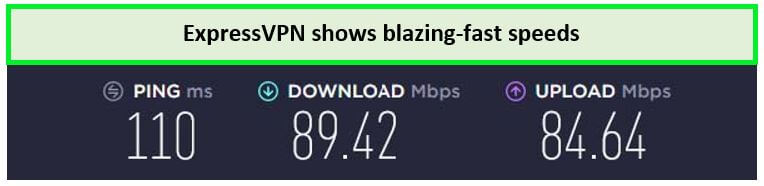
ExpressVPN delivers blazing-fast speed results on its New York server.
With all these features, Amazon Prime and even your ISP can never detect you are using the VPN to bypass the Firewall. Thus, your connection always remains stable.
ExpressVPN uses a patented light protocol to ensure you can watch your favorite Amazon media in 4K at ultra-high speeds and without any buffering.
Using ExpressVPN with Amazon Prime in USA, you can access all the media libraries on Amazon Prime but also bypass the geo-restriction on other platforms, including C31 in USA.
ExpressVPN is compatible with the most popular OS, including iOS, Android, Mac, Windows, Linux, etc. So, you can easily install it on smartphones, smart TVs, laptops, PCs, and gaming consoles. Our experience with setting up ExpressVPN on Amazon FireStick in USA went pretty well. Even if you cannot download the VPN directly on your device, you can install ExpressVPN manually on the Wi-Fi router in USA. So, every device connected to the same router has a VPN connection.
ExpressVPN provides military-grade AES 256-bit encryption, the same used by government officials to protect high-profile data. Also, the DNS/IP leakproof methodology and an Internet kill switch allow you to surf the browser completely in incognito mode. Furthermore, ExpressVPN provides a no-log data policy to ensure you never have to worry about privacy leaks.
Also, you may level up your security and privacy by paying for your ExpressVPN in cryptocurrency, e.g., Bitcoin, Ripple, or Ethereum.
The best thing about using ExpressVPN is that it allows users to experience all its features comfortably for the whole month. And even if you think it is not for you, cancel your ExpressVPN subscription in USA and claim a full refund with a 30-day money-back guarantee. So, it is like getting the strong obscure Amazon Proxies for free for a whole month! Not only this, but you also get an ExpressVPN free trial in USA on a smartphone application to know all its features completely.
A yearly subscription with Express VPN costs just $6.67/mo (Get 49% Off + 3 Months FREE on its 12-Month Plan). Moreover, if there is any VPN problem, 24/7 customer support can assist you on live chat.
If you want to look deeper into this VPN, then you can check out our ExpressVPN review in USA.
Pros
- Fastest internet speed among all the competitors
- Internet kill switch
- Secure connection
- Effectively bypass Amazon Prime’s restrictions
- DNS/IPV leakproof
- No log privacy policy
Cons
- Expensive than other VPN providers
2. Surfshark: Budget-friendly VPN to Fix Amazon Prime HTTP Proxy Error in USA
Key Features:
- 3200+ servers in 100 countries
- Unblocks Amazon Prime: Yes
- Netflix, BBC iPlayer, YouTube, Hulu, and Disney+ accessibility
- Streaming devices: Android, iOS, Amazon Fire, Apple TV
- Unlimited simultaneous connections
- Price: $2.30/mo
Surfshark is the best budget-friendly VPN for fixing Amazon Prime HTTP proxy error. If you are tight on the budget yet want to effectively get Amazon Prime streaming globally as it costs just $2.30/mo (Get 84% + 2 Months FREE on 2-Year Plan). Though it is not as old as its rivals, it has found its place in the top 3 VPNs to avoid Amazon HTTP proxy errors. Surfshark maintains its supremacy in offering excellent security features, ultra-fast speed, and economical pricing plans.
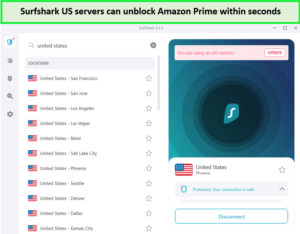
Surfshark servers provided exceptional unblocking abilities for Amazon Prime Video in–USA.
Surfshark has over 3200+ servers in 100 countries. Surfshark’s unblocking ability for Amazon Prime in USA to stream US titles was outstanding. As soon as we connected to its US-Buffalo server, all the US titles were ready to stream.
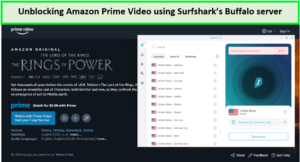
Surfshark servers helped us stream the latest episodes of The Rings of Power in HD quality, and that too without any errors in–USA.
Moreover, the Surfshark speed test in USA gave us an average download speed of 81.32 Mbps and an average upload speed of 76.12 Mbps over a 100 Mbps connection. This speed is fast enough to let you stream and access any media on Amazon Prime without glitches.
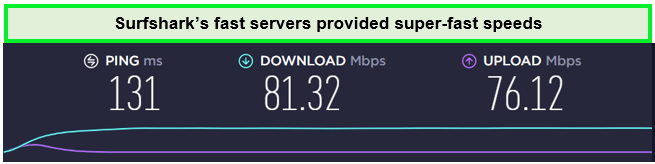
We did not experience any buffering or extensive loading time while streaming content.
The best part about getting Surfshark is that you can connect it to as many devices as you want without losing the connection stability. However, do not abuse this feature, as connecting too many devices can start affecting speed.
Also, it comes with an automatic ad blocker. So, with Surfshark, you will avoid all the nuisance caused by long ads popping during video streaming.
Furthermore, you can use Surfshark on all the popular OS on digital devices. Thus, you can download it on smart TVs, laptops, smartphones, and computers. We had no issues setting up Surfshark on Amazon FireStick in USA. It has a dedicated smartphone application for these devices to enhance user compatibility.
Surfshark offers an excellent internet kill switch, military-grade 256-bit encryption, and sophisticated technology to prevent DNS/IP leaks. Moreover, it does not keep any user logs and comes with a camouflage mode to disguise all your online information. Therefore, Amazon Prime can never detect you are accessing its content using a VPN proxy.
Also, with a 30-day money-back guarantee, you can always claim a complete refund. Moreover, if you want to test all the VPN features, you can get a Surfshark free trial in USA on a smartphone for seven days.
Still, facing any problems while using Surfshark VPN? Contact the 24/7 customer support on the live chat and let them help you fix it for you.
Read more about this VPN on Surfshark review in USA.
Pros
- Budget-friendly
- Compatible with all OS
- Unblocks Amazon Prime Video
- No log privacy policy
- No bandwidth limit – offer HD streaming
Cons
- Customer support lag
- Erratic P2P behavior
3. NordVPN: Largest Number of Servers to Fix Amazon Prime HTTP Proxy Error issues in USA
Key Features:
- 5500+ servers in more than 50 countries.
- NordLynx tunneling
- Unblocks Amazon Prime: Yes
- Other services unblocked: Netflix, BBC iPlayer, YouTube, Hulu, and Disney+.
- Simultaneous connections: 6
- Price: $3.99/mo
NordVPN has the largest number of servers to stream Amazon Prime without any proxy errors as it consists of 5500 servers across 60 countries. This means you can always shuffle to another if one has a problem. It helps you gain a lightning-fast speed without any bandwidth capping at 4K resolution. Moreover, this server variety helps you access content from any region around the globe.
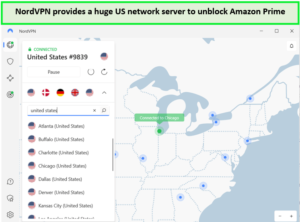
NordVPN’s US servers are quite reliable in unblocking Amazon Prime Video in–USA.
While unblocking Amazon Prime using NordVPN in USA, it gave us amicable results. As soon as we connected to the US-Atlanta server, all its American content was ready to stream readily.
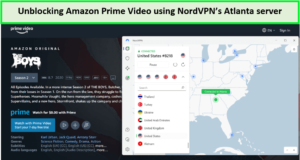
Through NordVPN servers, we rewatched The Boys without any proxy error interrupting our streaming session in–USA.
Also, the NordVPN speed test in USA gave an average download speed of 83.82 Mbps and an average upload speed of 44.64 Mbps over a 100 Mbps connection.
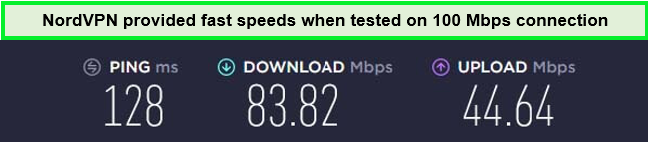
NordVPN servers were fast and efficient in unblocking Amazon Prime Video.
Moreover, not only Amazon Prime videos, NordVPN can unblock multiple other sites, including multiple Netflix libraries, Peacock TV, NOS, HBO, YouTube, etc. Also, it is compatible with the most popular OS like Mac, Linux, iOS, Android, and Windows. We had a great time testing NordVPN on FireStick in USA and streaming a bunch of shows on various streaming sites.
NordVPN provides perfect DNS/IP leakproof privacy with 256-bit military-grade encryption. It is among a few VPN providers that offer a Double VPN technology backed by obfuscation features and an Internet kill switch. All these features make NordVPN one of the most modern VPNs to bypass geo-restriction on international streaming platforms like Amazon Prime.
Want to take the security game up? Pay on your NordVPN through cryptocurrency to keep your payment identity hidden too!
NordVPN’s two-year plan comes under $3.99/mo (Get 57% Off + 3 Months FREE on 2-Year Plan) with a 30-day money-back guarantee. So, you can always ask for a full refund if you change your mind. Moreover, you can get a NordVPN free trial in USA for 7-days on a smartphone application to help you gauge the application features.
If you still face any problems, meticulous 24/7 customer support is there to help you on live chat. Learn more about this VPN in our NordVPN review in USA.
Pros
- Multiple servers globally
- Stable and fast internet connection
- Consistently unblock Amazon Prime Video
- Incredible privacy and security policies
- Updated regularly
- Accepts cryptocurrency for payment
Cons
- Torrent downloads glitches
- Non-user-friendly configurations of Open VPN
How Does Amazon Prime Block VPNs in USA?
Amazon Prime uses these 3 methods to block VPNs:
What to Watch on Amazon Prime in USA in July 2023?
After you fix Amazon Prime HTTP Proxy error in USA, you can enjoy watching the following popular and new releases on Amazon Prime:
FAQs – How to Fix Amazon Prime HTTP proxy error in USA
Yes, if you are traveling abroad, you may encounter an Amazon proxy error. So, carefully select your VPN to avoid such proxy issues. Our top recommendation for Amazon Prime Video is ExpressVPN.
If you are experiencing issues with Amazon Prime Video while using a VPN, it may be due to the streaming platform blocking your VPN’s server IP address or encountering an Amazon Prime HTTP proxy error. To resolve this, consider changing your account country and utilizing a reliable VPN service for Prime Video.
No, free VPN services cannot resolve the Amazon Prime proxy error in USA. Free VPN companies have lower server counts and only a few resources that do not give users good encryption and a dedicated IP address.
As they have less number of servers, Amazon Prime can easily detect Free VPNs when multiple logins occur from a single IP address. Thus, it blacklists free VPN IP addresses, which leaves you with an Amazon Prime VPN error.
There’s an alternative method to fix Amazon Prime HTTP Proxy Error in USA; Smart DNS Proxy. It’s capable of bypassing geo-restrictions just like any other VPN.
However, the catch is they only reroute a specific part of your connection which is your location. Another downside is they don’t hide or assign you a new IP address. They also fail to work properly if your ISP is using transparent proxies or DNS hijacking.
That’s why you’re better off using a premium VPN like ExpressVPN.
To clear the cache on Amazon Prime Video in USA, follow these steps:
Note: If you choose to press “Clear Data,” it will remove all your saved login details and passwords. Only select this option if you remember your login credentials and are willing to log in again.
Conclusion
Hopefully, now you understand how to fix Amazon Prime HTTP proxy error in USA. Using a reliable VPN can help you bypass Amazon geo-restrictions and access your favorite show and movies.
We recommend using ExpressVPN as it has the best connection speed and unblocking capability. Moreover, it provides its users with the best possible security and privacy protection.
In case you have any other questions, do not hesitate to comment below. We would be happy to help.

 English
 Dutch
Dutch French
 German
 Italian
 Japanese
 Korean
 Portuguese
 Russian
 Spanish