
How To Show Up in Google AI Overviews (Step-by-Step Guide)

Most small business owners didn’t sign up to become search experts.
You started a business to do the thing you’re actually good at: running a bakery, designing websites, fixing roofs, cutting hair. But along the way, the job grew. First, you needed a website. Then you needed to learn SEO and figure out how to rank #1. Then you had to show up in featured snippets.
And now, you need to understand how to show up inside an AI-generated answer at the top of Google.
At a certain point, it starts to feel less like running your business and more like chasing a moving target. But most of these shifts aren’t actually that big. They’re all parts of the same game, just with small changes to how your content gets chosen and displayed.
AI Overviews look like a major leap, but underneath, they still rely on the same core ideas that powered snippets and SEO fundamentals: clear answers, strong structure, and content that helps your customers solve their problems. Which means you don’t need to reinvent your whole strategy. You just need to learn how to package what you already have so it’s most likely to be chosen by Google’s AI.
That’s what we’re here to do.
What AI Overviews Are and When They Appear
Google says AI Overviews use a customized Gemini model working alongside its existing Search systems, including the Knowledge Graph and the quality and ranking systems that have powered Google for years.
They’re designed to surface information that’s “backed by top web results” and include links to supporting content so users can dig deeper.
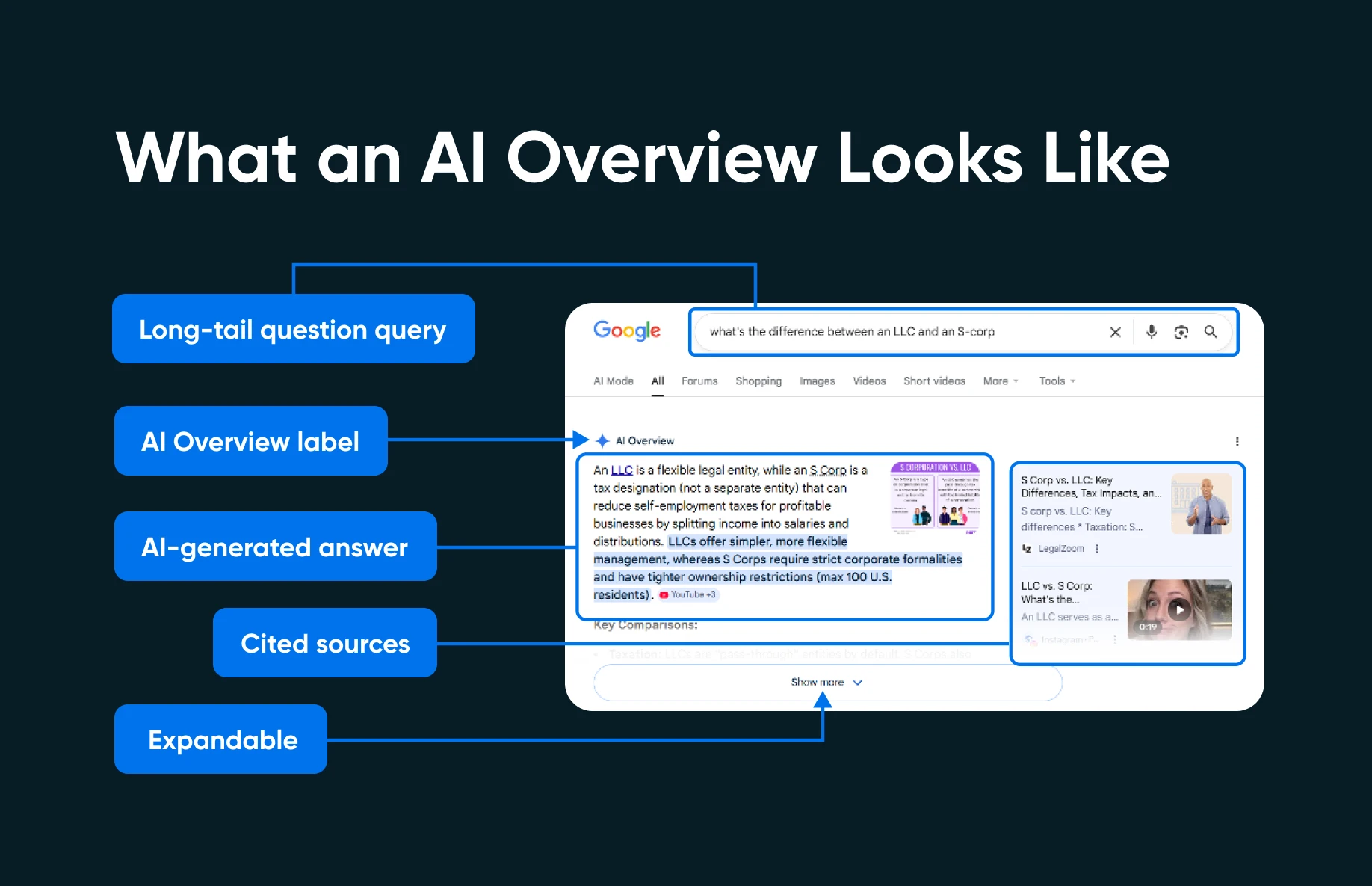
Not every search triggers an AI Overview. They show up most often for:
- Longer queries: 53% of searches with 10 or more words trigger an AI Overview, compared to just 8% for short one- or two-word searches.
- Question-based searches: Queries starting with who, what, when, or why trigger AI overviews 60% of the time.
- Complex, multi-part topics: The kinds of searches where a user is trying to understand something, not just navigate to a specific website.
This tells you something important about where to focus your efforts. If your content answers specific questions in your niche, like “how much does a new roof cost in Denver” or “what’s the difference between an LLC and an S-corp,” you’re targeting exactly the kinds of queries that trigger AI Overviews.
It’s also worth noting that the same content patterns that have always won featured snippets also feed AI Overviews. Optimizing for one effectively optimizes for both.
Content Structure That Gets Pulled Into AI Answers
AI Overviews don’t just reward good information. They reward good presentation of information. Google’s AI needs to extract a clear, coherent answer from your page, so if your content happens to be buried in long paragraphs without clear structure, the system will likely pull from somewhere else instead.
Three structural tactics make the biggest difference:
1. Put the Direct Answer First
This is the single highest-impact change you can make. For every key section on a page, write a 2-3 sentence “answer block” immediately below the header that gives the reader, and the AI, the core answer right away.
Do it this week:
- Open your top-performing blog post.
- Identify the main question it answers.
- Write a direct 2-3 sentence answer immediately below the first H2.
- Bold the single most important fact.
- Let the rest of the section expand on that answer with detail, examples, and context.
2. Use Headers That Match Real Questions
Your H2s and H3s act as important signals. When Google’s AI breaks down a user’s query into subtopics, it’s looking for pages that clearly address each one; headers that match the actual questions people ask make your page a natural fit.
The easiest way to find those questions is to use Google itself. Search your target keyword and look at the “People Also Ask” box that appears in the results. Those questions tell you directly what related queries users are exploring. If your headers match those questions, you’re aligned with how the AI system thinks about your topic.
Do it this week:
- Google your primary keyword.
- Write down every question that appears in the People Also Ask section.
- Compare those questions to the headers on your existing page.
- Restructure your H2s and H3s to match the real questions.
- Add new subsections for questions you haven’t covered yet.
3. Use Lists, Tables, and Scannable Formats
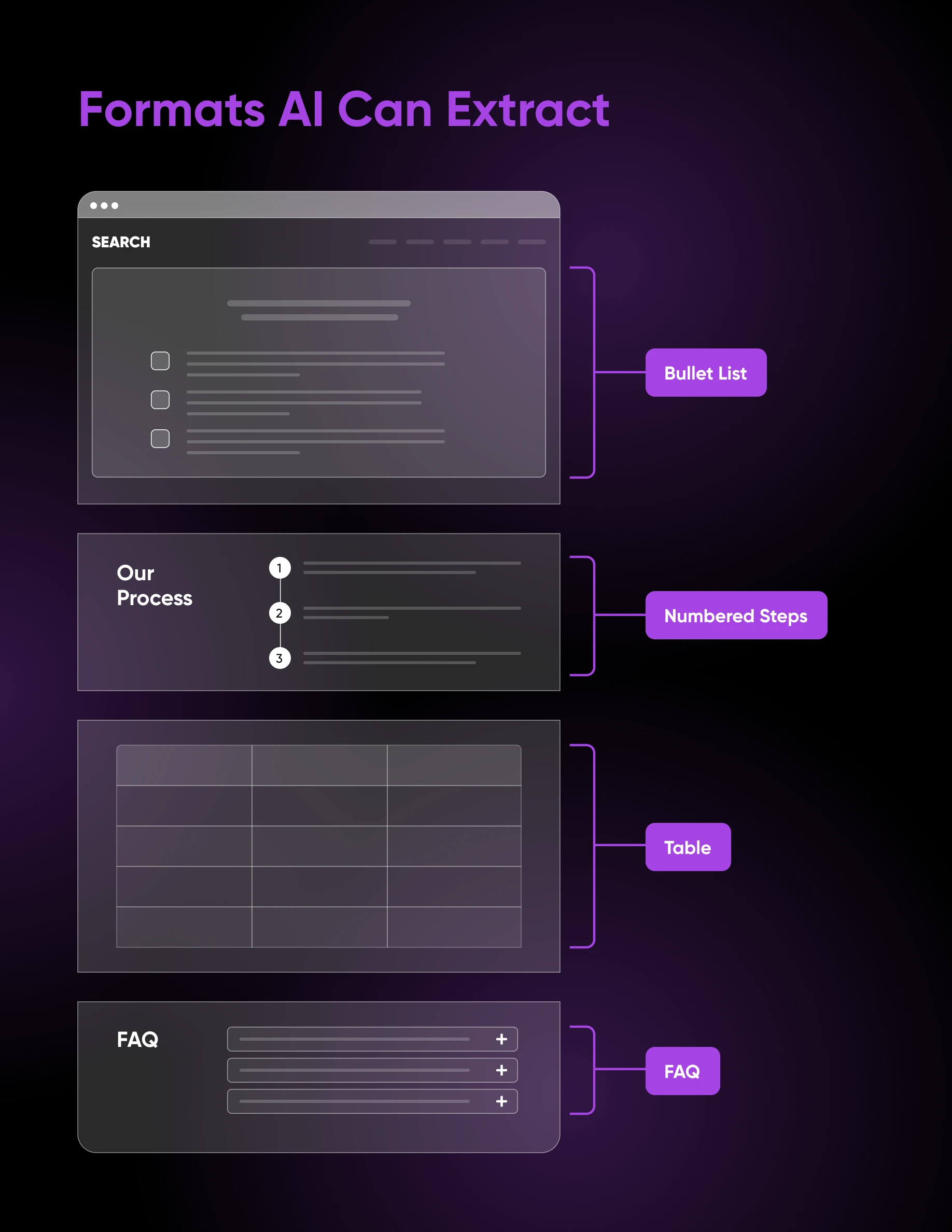
Google’s AI features and snippet formats reward content that’s structured for extraction. When you present information in a list, a table, or a clearly labeled step-by-step format, you make it easy for the AI to identify discrete pieces of information and pull them into a summary.
This doesn’t mean every section should be a bulleted list. But any time you’re comparing options, listing steps, or presenting multiple related items, structured formatting will outperform a wall of prose, both for human readers and for AI systems.
Do it this week:
- Scan your top pages for any section that describes three or more comparable items in paragraph form.
- Convert it to a bullet list or a comparison table.
- Add a brief intro sentence before the list and a short closing sentence after.
Tracking Your AI Overview Appearances
You can’t improve what you can’t measure. Here’s how to know whether your pages are showing up in AI Overviews.
Google Search Console’s methodology documentation explains how AI features are tracked. The key details worth understanding:
- Impressions have specific rules: For an AI Overview impression to count, the Overview must be scrolled or expanded into view by the user.
- All links share one position: Every link inside an AI Overview is assigned the same position value in Search Console. This is different from traditional organic results, where each link has its own position.
- Your existing totals already include AI features: Search Console’s Performance report doesn’t separate AI Overview data into its own tab; it’s rolled into your overall numbers. That means your impressions and clicks may already reflect AI feature appearances without you realizing it.
AI Overviews Are Less Scary Than You Think
When you zoom in on AI Overviews, Google is still trying to do what it’s always done: surface the most useful answers. That means your job hasn’t really changed.
The businesses that show up in AI Overviews aren’t necessarily the biggest or most established. They’re just the ones that make the answers most obvious. They remove ambiguity and structure their content so there’s almost no other choice but for Google to use it.
Once you start thinking that way, AI Overviews become a lot less scary and start looking like another distribution channel you can use strategically to grow your business.

[Download] 2026 Getting Found in the Age of AI Search
Is Your Website Invisible to AI Search?
Nearly 7 in 10 Google searches now end without a click. This 40-page ebook gives small business owners an action-ready GEO plan to show up in Google’s AI Overviews, ChatGPT, and Perplexity — no agency, no dedicated SEO team required.
Get The Playbook
Did you enjoy this article?

 English
 Dutch
Dutch French
 German
 Italian
 Japanese
 Korean
 Portuguese
 Russian
 Spanish