
Social Media Automation: Build Your Brand the Easy Way

You don’t have to be a Kardashian to take social media seriously. Posting great content is a proven way to earn the attention and trust of your potential customers.
Our own data proves it. The DreamHost’s 2026 Local Business Trust Index survey found that almost 20% of 18-24-year-olds start their conversion journey on places like TikTok or Instagram. Social media is where discovery happens.
But unlike members of a famous reality TV family, you probably don’t have all day to take selfies and update your stories.
The solution? Social media automation. Instead of posting by hand, you can build smart workflows that keep your accounts active without touching them every day.
Here’s how to build a social following for your business without growing your task list.
Content Calendar and Scheduling
As any social media expert will tell you, success starts with posting regularly. Ideally, at least once a day.
To make this sustainable in any way, you need to plan ahead. Marketers will often use a calendar to plan out and schedule social content, sometimes months in advance.
Filling Your Calendar
To follow suit, you first need some ideas. A lot of ideas.
While it might be tempting to book a week in the tropics for brainstorming, there’s actually a much faster way.
Modern social media management platforms like Buffer, SocialBee, and Predis.ai offer built-in tools that help you create a winning calendar in a few clicks.
Here’s how it works in SocialBee:
Another approach is to curate existing content and turn it into something new.
SocialBu – not to be confused with SocialBee – has a dedicated curation tool built exactly for this. You can filter your feed, pick out the best posts, and then get AI to generate your own version.
Smart Scheduling
You’ve now got some content. The next task is to decide when to share it.
SocialBee can automatically add your AI-generated posts to your calendar, based on the most popular times of the week for the average social audience.
If you want something more personalized, you could try scheduling your content with Buffer’s Answers feature. This looks back at your past performance to determine the best times to post for your Instagram audience.
You can then set this as your new schedule, and new posts will automatically be queued up in the optimal time slots.
Evergreen Content Recycling
Evergreen content is timeless by design. You could post them over and over again for years, and people will find value time and time again.
Some examples:
- Anniversaries/Annual holidays
- How-to guides
- Customer success stories
- Testimonials
- Inspiring quotes
Posts like these earn their keep twice: they fill calendar gaps and deliver value every time they run.
Just don’t go repeatedly scheduling them by hand. We can automate that.
Sendible is our tool of choice here:
Sendible will then periodically repeat posts in your smart queue automatically.
In the “Calendar” view, you’ll also find the option to enable all major holidays. Click on any of these posts, and Sendible will set up a new post draft and supply a suitable image.
Posting and Triggers
When you have something new to share, you can post quickly to multiple channels using automations. Zapier and Make are useful for this; both platforms have numerous templates.
For example, with this pre-made Zapier automation, any photo you add to a Dropbox folder is automatically turned into a new image post on your business Instagram account.
You can also turn website updates into content using these platforms, such as posting new products on your Shopify store as images on Facebook.
Other cool ideas for triggers include:
Any kind of visible update about your business could be made into social content.
Repurposing
Do you blog? Record podcasts? Upload videos? These can all be converted into social content. Buffer has an AI tool that lets you repurpose written content for different networks and post across those channels.
Better still, you can cut yourself out of the process completely.
With tools like Zapier and Make, you can set up automations to repurpose new articles into social content and publish the posts automatically.
For instance, this Zapier automation grabs posts from your blog and posts them on Facebook and LinkedIn.
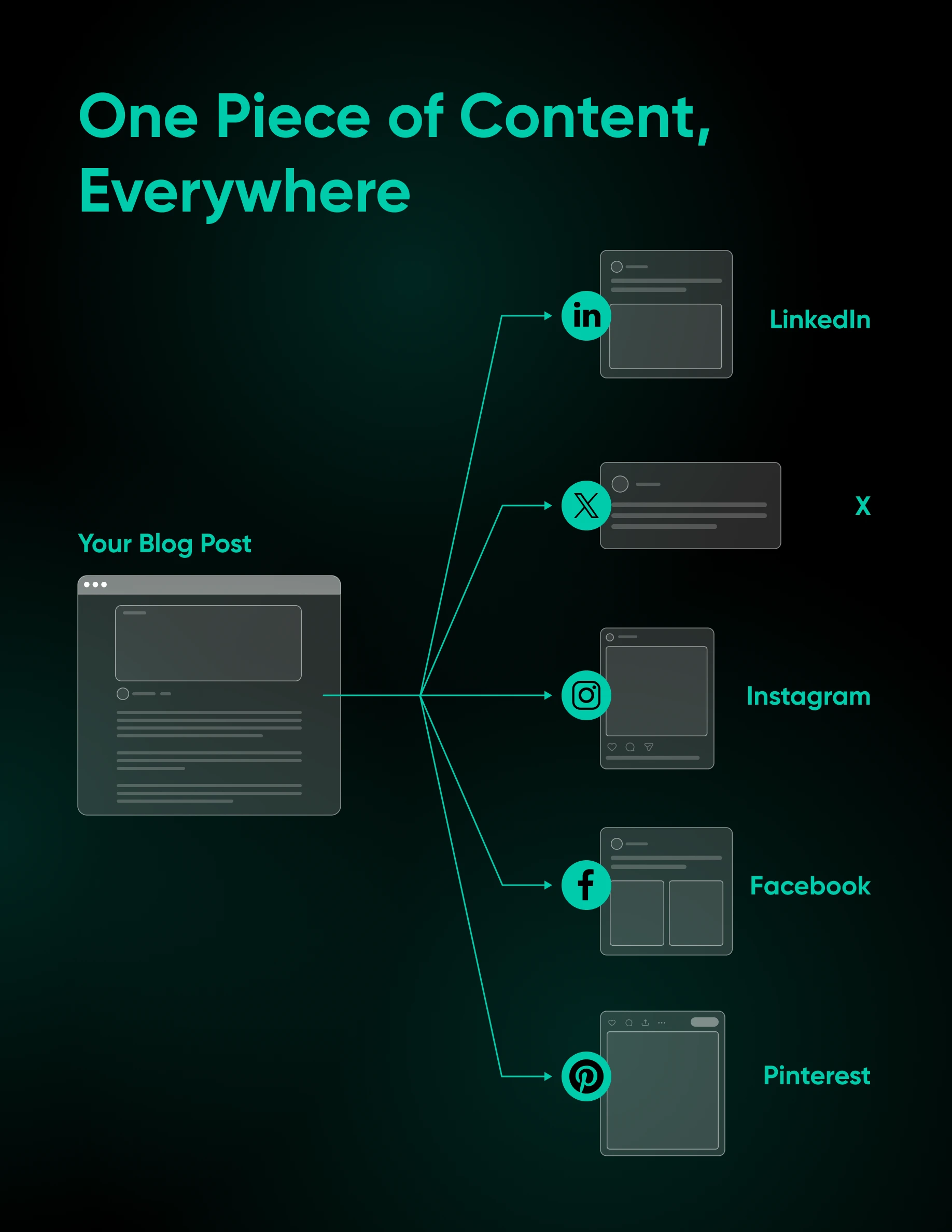
For images and video, dedicated tools like Repurpose.io allow you to share stories and posts on multiple platforms. This particular platform supports workflows, allowing you to add descriptions automatically and extract clips from long-form videos.
Extend Your Reach Further
Social platforms are a great place to pick up new customers and promote your brand. And as we’ve seen, you don’t need to dedicate hours to managing your accounts.
Of course, all those followers need somewhere to land. If your website isn’t ready for the traffic you’re about to send it, DreamHost has you covered.
DreamHost offers affordable, reliable hosting for businesses of all sizes. And when you sign up, you get access to two powerful AI website builder tools: Liftoff if you’re working in WordPress, or Remixer if you’re starting fresh. Either way, you can have a professional-looking site up in minutes.
Want to give them a try? Sign up for a hosting account today!

[Download] 2026 Marketing on Autopilot
Stop Doing Marketing By Hand.
91% of marketers say automation helps them hit their goals. This 49-page ebook gives small business owners playbooks for email, SMS, social, paid ads, and analytics — running themselves while you focus on the work that actually moves the needle.
Get The Playbook
Did you enjoy this article?


 English
 Dutch
Dutch French
 German
 Italian
 Japanese
 Korean
 Portuguese
 Russian
 Spanish